
Windows 11 · Linux · macOS · x86 · Arm
Choose virtual machine software by the computer you need to create.
“Best” is not one contest. A Windows developer preserving Hyper-V and WSL2, a Linux administrator operating KVM servers, a Mac owner running Windows 11 Arm and a researcher emulating RISC-V need different owners and execution paths.
The first decision
Architecture before brand.
Hardware virtualization is fast when host and guest architectures match. Emulation translates a different machine and makes a wider set of systems possible, with a performance cost.
Selection matrix
Seven products, seven ownership models.
Compare the natural job for each product and the boundary that deserves a real test. A generic score would hide the most important differences.
Product names and logos are trademarks of their respective owners. They identify the independently compared products and do not imply endorsement of VMBook. Links lead to each vendor's official site or documentation.
| Product | Natural host and workload | Execution and ownership | Strong reason to choose it | Boundary to test |
|---|---|---|---|---|
| VMBook | Windows and Linux now; mixed local and remote estates | Owns explicit QEMU definitions; delegates supported operations to native providers such as Hyper-V and libvirt | Visible QEMU command, image workflows, remote sites and one provider-aware inventory | Early product; no mature automatic HA, distributed storage, enterprise SSO or universal migration claim |
| VirtualBox | Established desktop VM and appliance workflows on supported hosts | Owns VBOX definitions, VDI media, networks and Guest Additions | Familiar all-in-one desktop application and a large existing VM base | Test the exact host release, hypervisor coexistence, USB, graphics and separately licensed components |
| VMware Workstation Pro | Windows or Linux labs invested in VMware virtual hardware | Owns VMX definitions, VMDK chains, VMware devices and guest tools | Mature desktop networking, clones and compatibility with existing VMware VMs | Broadcom download workflow; leaving VMware involves devices and drivers, not just VMDK conversion |
| Microsoft Hyper-V | Windows 11 Pro/Enterprise and Windows Server estates | Microsoft owns the VM, switches, checkpoints and PowerShell objects | Native Windows administration and continuity with Hyper-V infrastructure | Client Hyper-V is not on Windows Home; edition and hardware requirements apply |
| UTM | Mac users wanting Apple-native virtualization or approachable emulation | UTM owns its bundle and selects its QEMU or Apple backend | A strong Mac experience for both same-architecture VMs and foreign-architecture systems | Emulation is slower; backend device and sharing capabilities differ |
| Parallels Desktop | Mac users prioritizing polished Windows integration | Parallels owns its bundle, guest tools and Mac integration | A supported Windows 11 Arm path on Apple silicon and commercial support | Commercial software; Apple-silicon guests are architecture-sensitive |
| QEMU directly | OS development, automation, debugging and architecture research | The operator owns the command, firmware, devices, images and management integration | Maximum machine-model flexibility, many architectures, QMP and image tooling | An engine and toolkit—not by itself the uniform desktop or fleet workflow many users expect |
Host operating system
The host changes the shortlist.
Windows 11
Hyper-V is the native owner when Microsoft should control machines, switches and checkpoints. Microsoft documents Client Hyper-V for Pro and Enterprise, not Home, with SLAT and firmware virtualization requirements.
VMBook can use WHPX for eligible QEMU guests while preserving supported Hyper-V machines and WSL distributions under their real owners. Before choosing, record VBS, Memory Integrity, WSL2 and Hyper-V state.
VMBook on Windows · WHPX explainedLinux
QEMU commonly provides the machine model while KVM accelerates compatible guests. Libvirt may own durable definitions, permissions, networks and storage even though QEMU runs the process.
Choose virt-manager for detailed local libvirt administration, direct QEMU for exact machine experiments, or VMBook when images, QEMU definitions, existing libvirt domains and remote computers need a broader view.
VMBook on Linux · QEMU vs KVMmacOS
On Apple silicon, Windows 11 Arm is a native-architecture path; an Intel guest requires emulation. Parallels leads with polished commercial integration. UTM offers Mac-native access to QEMU and Apple Virtualization.
VMBook's macOS provider work points toward a cross-platform inventory, but signed packaging and named-hardware validation are not yet mature enough to erase the shipping-product advantage of UTM or Parallels.
VMBook's macOS statusFree VM software
“Free” has four meanings.
Price alone is a poor migration reason. Separate the program's price, source access, support model and every guest operating-system license.
Price to useVMBook is proprietary and free for personal, educational and commercial use. Current VMware Workstation Pro and Fusion Pro releases are also free under Broadcom's published terms.
Source availabilityQEMU and UTM are open source. VirtualBox combines a base package with components whose terms should be checked separately.
Support and distributionParallels is commercial. UTM distribution channels may differ. Hyper-V follows the Windows edition and Microsoft's servicing model.
Guest licensesNo VM manager grants a Windows, macOS or application license. VMBook also expects QEMU to be installed separately.
A defensible choice
Choose the owner before downloading another VM app.
Describe the guest
Record OS, CPU architecture, firmware, disk formats, snapshots, devices and performance needs.
Inspect the host
Confirm OS edition, CPU architecture, hardware virtualization and security features already in use.
Name the owner
Decide whether QEMU, Hyper-V, libvirt, VirtualBox, VMware, UTM or Parallels should remain authoritative.
Test recovery
Boot a copy, test devices and networking, shut down cleanly and restore independently before migrating.
Where VMBook fits
The machine, its image and its host remain connected.
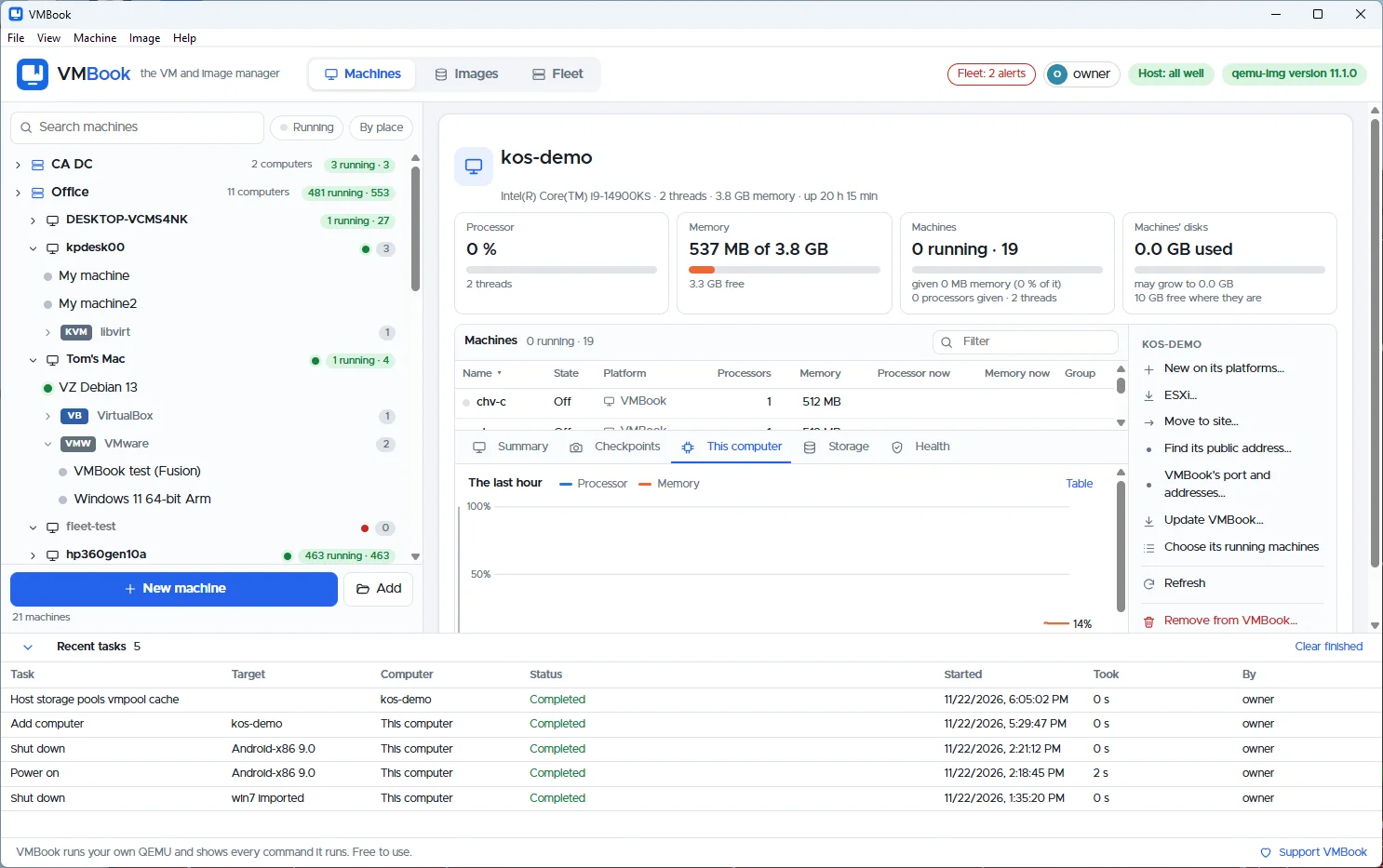
VMBook is most distinctive when the work crosses boundaries that a single desktop hypervisor keeps inside its own library:
- visible QEMU commands and explicit CPU, board, firmware and device choices;
- QEMU/WHPX alongside supported Hyper-V and WSL objects on Windows;
- QEMU/KVM plus delegated libvirt operations on Linux;
- qcow2, VDI, VMDK, VHD/VHDX and raw image inspection or conversion;
- local and remote computers organized into sites with TLS certificate pinning;
- architecture-aware paths for x86-64, Arm64, RISC-V and other QEMU targets.
Current boundary: VMBook does not claim mature automatic HA, distributed storage, DRS-class scheduling, enterprise identity federation or universal cross-provider live migration. A wider view is not a substitute for those mechanisms.
Practical answers
Virtual machine software FAQ
What is the best virtual machine software?
There is no universal winner. Choose by host operating system, guest CPU architecture, existing VM format, device needs and who should own the machine. Hyper-V is a natural Windows owner; Parallels focuses on Windows integration on Mac; UTM combines Mac-native choices with QEMU; VirtualBox and VMware Workstation provide mature desktop workflows; QEMU provides machine and architecture flexibility; VMBook connects QEMU, images, native providers and remote computers in one provider-aware view.
What is the best free virtual machine software for Windows 11?
First check the Windows edition, guest architecture and whether Hyper-V, WSL2 or virtualization-based security must remain enabled. Hyper-V is included with qualifying Pro and Enterprise editions. Current VMware Workstation Pro releases are free under Broadcom's published terms. VirtualBox and QEMU-based tools are additional choices. VMBook is free to use but requires QEMU separately.
Is VMBook a QEMU GUI?
For VMBook-owned QEMU machines, yes: VMBook provides a graphical workflow and exposes the generated QEMU command. It also manages disk images, remote computers and defined operations for supported native providers. It does not disguise a provider-owned machine as a QEMU definition.
Can VMBook manage Hyper-V and KVM?
VMBook has provider-aware paths for native Hyper-V objects and Linux libvirt domains. Compatible VMBook QEMU guests can use WHPX on Windows or KVM on Linux. The native platform remains authoritative for settings VMBook does not safely expose.
Can I move a VirtualBox or VMware VM into QEMU?
Often, but converting VDI or VMDK storage is only one step. Firmware mode, disk controller, network adapter, guest drivers, activation and snapshots also matter. Test a copy and preserve the original machine until the guest boots and its applications are verified.
Can an Intel Windows VM run on an Apple-silicon Mac?
Not through ordinary same-architecture hardware virtualization. An x86 guest on an Arm host needs emulation or another compatible execution path, and performance and device support differ. For routine Windows use on Apple silicon, Windows 11 Arm is usually the native-architecture path.
Does VMBook include QEMU or an operating-system license?
No. VMBook uses a separately installed QEMU and does not bundle guest operating systems or their licenses. Verify the host software, guest OS and application terms independently.
Is a VM snapshot a backup?
No. A snapshot is normally dependent on the base disk and the same storage system. A backup needs an independent recovery path, retention policy and restore testing.
Is desktop virtual machine software enough for a production cluster?
Usually not by itself. Production clusters also need failure detection, fencing, quorum, placement, shared or replicated storage, backup and recovery, identity controls and lifecycle operations. Evaluate a cluster platform when those are requirements.
Primary sources
Verify the technical claims.
- QEMU: About QEMU
- QEMU system emulation introduction
- Oracle VirtualBox User Manual
- Broadcom desktop hypervisor licensing
- Microsoft: Install Hyper-V
- Microsoft: Hyper-V requirements
- UTM documentation
- UTM QEMU backend
- UTM Apple backend
- Parallels Desktop requirements
- Parallels: Windows 11 on Apple silicon
Continue researching