The VMware name and logo identify the platform being compared. VMBook is not affiliated with or endorsed by VMware or Broadcom.
VMware exit planning · responsibility before product ranking
Choose a VMware alternative by the responsibility it must replace
Leaving VMware can mean replacing one ESXi host, a vCenter cluster or an entire private-cloud operating model. Inventory compute, storage, networking, availability, backup, identity and recovery first—then shortlist platforms capable of owning them.
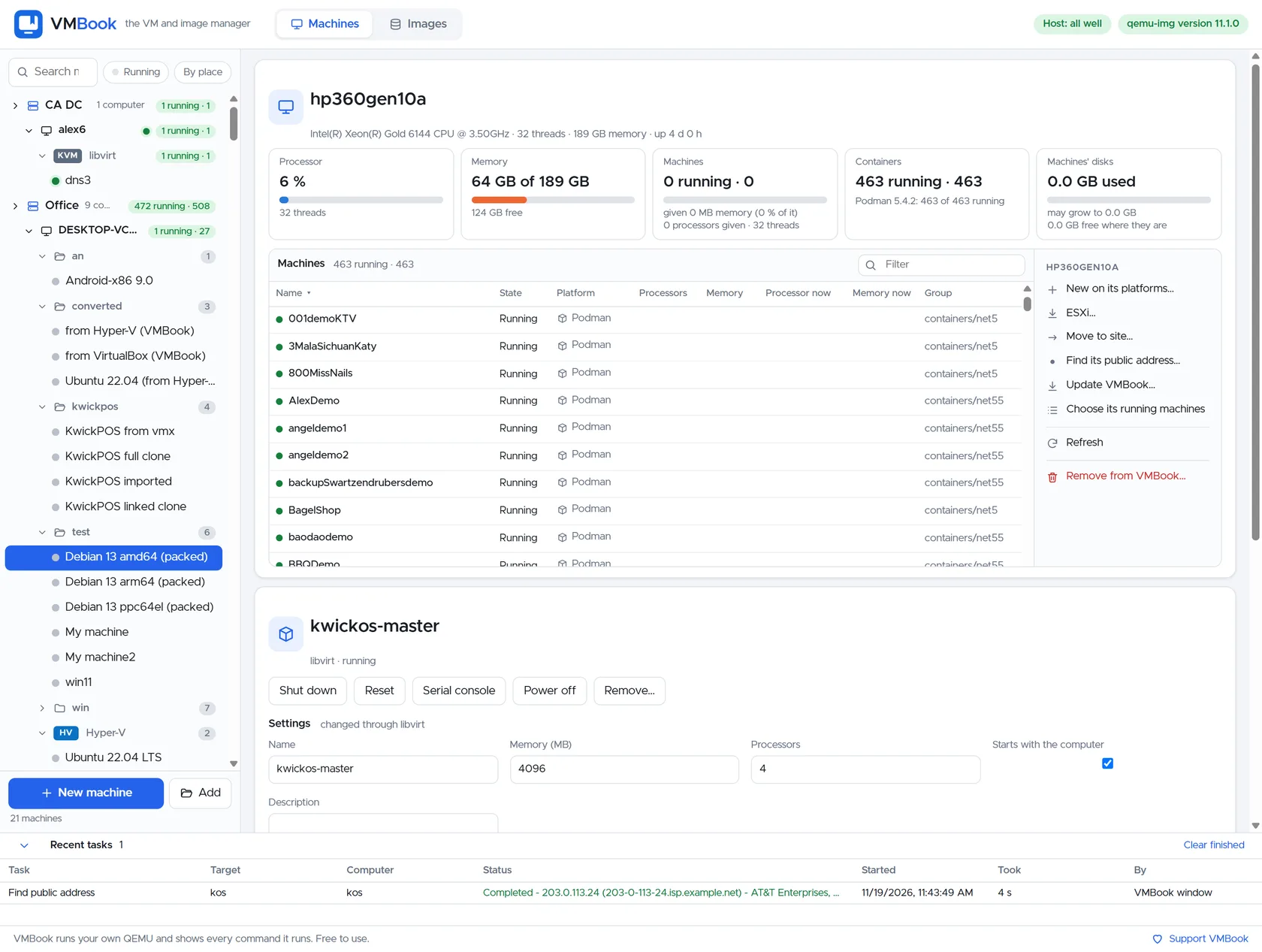
Real VMBook interface · unlike providers retain their own identity and owner.
THE FIRST DECISION
Define what “VMware” means in your environment.
VMware Cloud Foundation is broader than a hypervisor. VMware currently describes it as an integrated private-cloud platform spanning vSphere compute, vSAN storage, NSX networking, operations, automation and Kubernetes. Selecting a free hypervisor while leaving storage protection, network policy, self-service, lifecycle and recovery undefined is not a replacement plan.
VMBook helps during a mixed transition by placing VMware-owned machines beside QEMU/KVM, Hyper-V, Proxmox and libvirt inventory. It can inspect and convert copied virtual disks and build a separate destination machine. It does not replace vCenter, vSAN, NSX, DRS, VMware HA or VMware Cloud Foundation lifecycle management.
01 · EXECUTION
Hypervisor replacement
The target must boot the guest, present compatible CPU and devices, attach storage and networking, and expose a usable console.
02 · OPERATIONS
Cluster replacement
Membership, maintenance, migration, scheduling, permissions, audit, upgrades and failure behavior need an owner beyond the hypervisor.
03 · PLATFORM
Private-cloud replacement
Compute, storage, network security, automation, Kubernetes, governance and recovery must form a supportable operating model.
Pexels editorial infrastructure scene · not a VMBook interface, benchmark, compatibility test or migration result.
Infrastructure context
The replacement decision reaches below the VM.
Server firmware, storage paths, network design, accelerators and support ownership survive a control-plane change. Record them before choosing a destination: a candidate that boots the guest can still fail the operational requirements around it.
Shortlist by operating model, not logo.
Every candidate below can be correct in a particular environment. The important distinction is who will own the responsibilities VMware previously supplied—and what the team must operate itself.
Proxmox VE
An integrated Linux virtualization stack combining KVM virtual machines, LXC containers, flexible storage, clustering, backup and multi-node HA. It fits teams prepared to own Linux, storage and network design while valuing open-source foundations.
Nutanix Cloud Platform
A vendor-supported HCI and private-cloud route combining AHV with AOS storage, Prism operations and optional Flow network security. It belongs on the shortlist when integrated compute, storage, availability and lifecycle matter more than lowest acquisition cost.
Azure Local / Hyper-V
A Microsoft-centered route. Azure Local combines Hyper-V, Storage Spaces Direct, Failover Clustering and Azure management services on validated infrastructure. An ordinary Hyper-V host is a narrower decision and should not be confused with that HCI model.
OpenShift Virtualization
A Kubernetes-first application platform where KVM virtual machines become Kubernetes resources beside containers. Adopt it because operators want reconciliation, operators, GitOps and shared VM/container governance—not merely because it also runs KVM.
XCP-ng + Xen Orchestra
A focused Xen platform with pool management, HA and an integrated management plane for backup, replication, disaster recovery, ACLs and self-service. Confirm storage, CPU compatibility, Xen Orchestra availability and the desired support path.
OpenStack
An API-first multi-tenant IaaS cloud that coordinates pools of compute, storage and networking. It is appropriate when projects, quotas, tenant networks, cloud APIs and a service catalog justify a dedicated platform team.
VMBook
A free heterogeneous transition and management layer for environments that cannot standardize every computer immediately. It contributes provider-aware inventory, image inspection and conversion, QEMU machine construction and cross-architecture reach.
Responsibility map · not a universal ranking
Match the candidate to the job.
Verify current editions, hardware, support and migration tooling with each vendor or project.
Candidate
Strong reason to shortlist
Operating commitment
Unresolved VMware responsibility
Proxmox VE
Integrated KVM/LXC, storage, backup and HA
Linux, cluster, storage and network operations
Map DRS policy, vSAN/NSX and application acceptance
Nutanix
Supported integrated HCI/private cloud
Standardize platform, hardware and licensing
Edition, certification, migration and DR acceptance
Azure Local
Microsoft hybrid-cloud and HCI model
Validated hardware, S2D, clustering and Azure governance
Connectivity, guest rights and network/storage design
OpenShift Virtualization
VMs under a Kubernetes application platform
OpenShift, KubeVirt, CSI, networking and GitOps
Translate storage, network and operational policy
XCP-ng + XO
Focused Xen pools, backup and HA
XAPI/Xen operations and shared storage
VMware device/driver conversion and recovery tests
OpenStack
API-first multi-tenant IaaS
Distributed cloud services and platform operations
Rebuild identity, tenant networks, volumes and automation
VMBook
Mixed-provider visibility and image work
Operate each native provider honestly
HA, fencing, distributed storage, SDN and governance
Before requesting quotes
Build the dependency ledger VMware made easy to overlook.
A platform can look less expensive until the design adds back storage, networking, recovery, identity, automation and the people required to operate them.
Compute and virtual hardware
ESXi and virtual hardware versions
CPU baseline and guest-visible features
BIOS/UEFI, Secure Boot, vTPM and recovery material
Controllers, NIC models, VMware Tools and vendor modules
GPU, SR-IOV, USB and PCI passthrough
Application and vendor certification
Storage
Datastores, policies and failure domains
Complete VMDK descriptor, extent and snapshot chains
Thin allocation, discard and expected growth
vSAN, SAN, NAS and local dependencies
Encryption and key ownership
Application-consistent backup integration
Network and security
Port groups, VLANs, overlays, MTU and routing
NSX firewall and microsegmentation rules
Load balancers, NAT, public addresses and DNS
Address and MAC preservation
Management, storage and migration separation
Availability and mobility
HA, DRS and affinity policies actually used
Maintenance and evacuation expectations
vMotion dependencies and accepted downtime
Target quorum, fencing and single-writer protection
Reserved capacity after a host failure
Operations and governance
vCenter roles and identity integration
PowerCLI, Terraform, API and ITSM workflows
Monitoring, capacity and audit retention
Patching, firmware and rolling upgrades
Support and escalation requirements
Recovery
Backup application and supported target
Immutable/off-site copy and retention
RPO and RTO by application service
Boot order, secrets and network remapping
Evidence from an isolated restore
A migration wave that can stop safely.
A good exit plan is reversible at every stage. It measures one workload, updates the next wave with evidence and stops when the destination cannot own a discovered dependency.
Classify, do not bulk-export
Group workloads by downtime, storage/network complexity, devices, owner and support certification. A simple appliance and database cluster need different runbooks.
Select an operating model
Name the owner of compute, storage, network, availability, backup, identity and upgrades. Record which capabilities are native and which require another product.
Preserve the complete source
Use a supported export or controlled shutdown. Retain VMX, every VMDK extent, snapshot information, NVRAM, recovery keys and application procedures.
Reconstruct a separate destination
Choose firmware, CPU, storage controller and NIC deliberately. Boot on an isolated network so duplicate names, addresses and scheduled jobs cannot affect production.
Accept the application
Verify data, users, time, network policy, monitoring, backup, performance and shutdown. A login screen is not application acceptance.
Prove rollback and recovery
Retain the source powered off through the acceptance window. Back up and restore the destination on documented replacement capacity.
Learn before the next wave
Update duration, driver, capacity and rollback assumptions from measured results. Do not scale an unresolved exception.
Where VMBook helps now
Place ESXi inventory beside Proxmox, Hyper-V, libvirt and QEMU.
Retain provider and host identity.
Open the native ESXi management path.
Import an eligible powered-off guest into a separate copy.
Inspect VMDK inputs and image metadata.
Convert copied storage without overwriting the source.
Expose architecture, firmware, controllers and QEMU command.
Organize sites, computers, BMC evidence and workloads.
What build 1.0.0 does not claim
No vCenter replacement.
No VMware HA, DRS or provider-owned vMotion parity.
No vSAN or distributed-storage replacement.
No NSX overlay or distributed-firewall replacement.
No automatic HA restart, quorum or fencing.
No transfer of licensing or vendor certification.
No universal zero-downtime promise.
Controlled evaluation
Keep the source authoritative while you test the destination.
Start with one non-production machine, preserve its VMware definition and disks, and use VMBook to inspect the copied storage and destination machine contract.
There is no universal winner because VMware can mean ESXi, vCenter, vSAN, NSX or the wider VMware Cloud Foundation platform. Proxmox VE, Nutanix, Azure Local, OpenShift Virtualization, XCP-ng and OpenStack solve different operating-model problems. The correct shortlist begins with the responsibilities the existing estate actually uses.
Is there a free VMware alternative?
Open-source platforms such as Proxmox VE, XCP-ng, OpenStack and KVM/libvirt can avoid a proprietary hypervisor fee, and VMBook itself is free to use. Software price does not remove the cost of compatible hardware, storage, networking, backup, operations, training, validation and support.
Can VMBook replace VMware ESXi or vCenter?
VMBook can represent ESXi-owned inventory in a mixed fleet and help inspect or convert copied VMware disks. VMBook build 1.0.0 does not claim vCenter cluster operations, vMotion, DRS, VMware HA, vSAN, NSX or VMware Cloud Foundation lifecycle parity.
Can I convert a VMDK to qcow2 and call the migration complete?
No. Conversion changes the disk container. A complete migration must reconstruct firmware, CPU and device expectations, preserve the snapshot chain, supply destination drivers, resolve identity and licensing questions, and pass application and recovery tests.
Is Proxmox VE a replacement for VMware?
Proxmox VE can own many virtualization responsibilities for teams prepared to operate its Linux, cluster, storage and network model. It is not automatically equivalent to every vCenter, vSAN, NSX, DRS or third-party integration an existing VMware estate uses.
Can a VMware VM be migrated with no downtime?
Sometimes a supported migration path can limit downtime, but the result depends on source and target support, storage, dirty-page rate, bandwidth, drivers and device compatibility. Define and measure an accepted outage instead of promising zero downtime.
What should be migrated first?
Choose a non-critical workload with a named owner, independent backup, simple network, no passthrough hardware and a clear application acceptance test. Avoid beginning with identity, DNS, backup infrastructure or the only copy of business data.
Should an organization replace VMware all at once?
Usually not. A wave plan exposes hidden dependencies before they affect critical workloads. Mixed-platform operation is reasonable during transition when each workload has one authoritative owner and explicit monitoring, backup and escalation paths.
Evidence and review
Primary sources, visible product boundaries.
Technical owner · Tom JinApplies to · VMBook build 1.0.0Reviewed · 24 November 2026
The platform descriptions above were checked against current official documentation. Product packaging and supported combinations can change; validate the exact release and contract before a production decision.