Choose a system, not a recipe
Pick Debian or Ubuntu and make a user. VMBook downloads the distribution’s own image, checks it, and creates a thin machine layer.

Version 0.1 · early access
A free VM manager for students, developers, homelabs and real infrastructure. On Windows 11 it works through WHPX beside Hyper‑V and WSL2; across QEMU hosts it can model x86‑64, Arm64, RISC‑V and POWER without hiding the command underneath.
qemu-system-x86_64 -accel whpx -m 4096…Results recorded from real runs on Windows 11 and Debian 13; exact speed depends on the host and guest.
The real product
This is the current application—not a concept rendering. One window shows the host, its machines, their state and the exact settings VMBook gives QEMU.
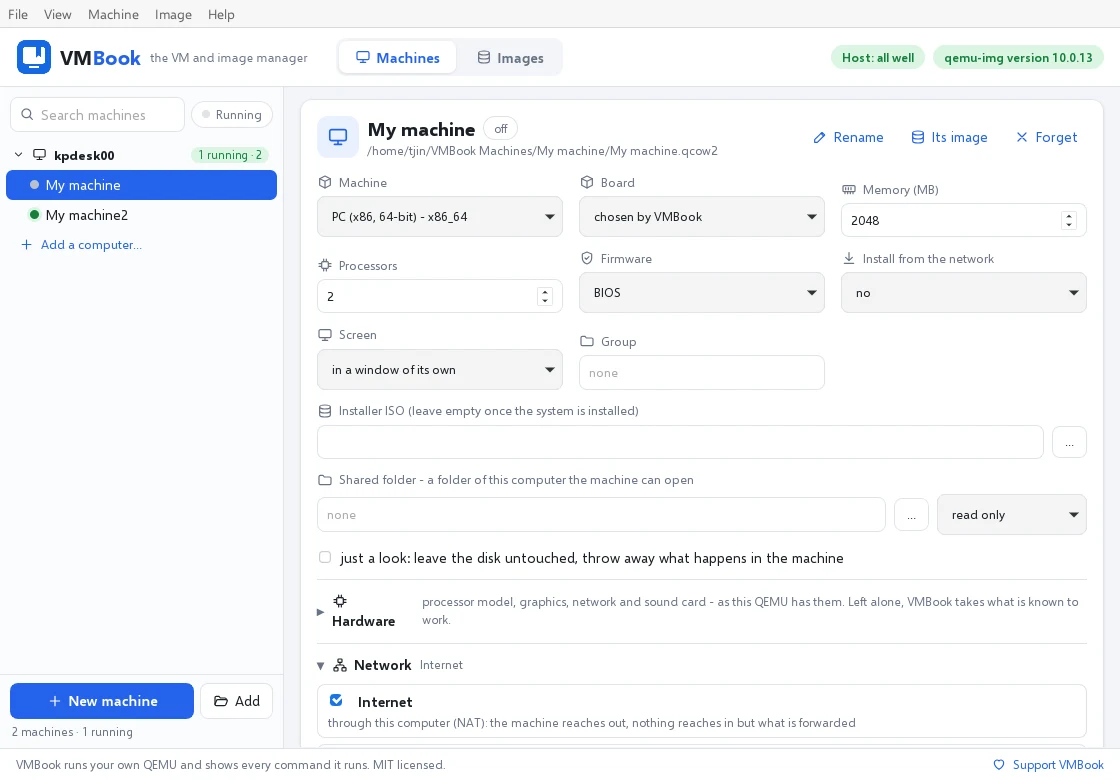
The ambition
VMBook starts with one desk: machines, images, networks and a console that anyone can use. Its architecture already separates the window from the host service, so adding remote hosts, tasks, storage and fleet controls grows the same product instead of replacing it.
Start with the job
VMBook handles the small, fiddly pieces that usually turn “start a VM” into an afternoon of documentation.
Pick Debian or Ubuntu and make a user. VMBook downloads the distribution’s own image, checks it, and creates a thin machine layer.
Work in VMBook’s built-in console. Detach it and the machine keeps running; attach again when you need it.
The exact QEMU command appears before it runs. Copy it, learn from it, or edit it. The window never becomes a black box.
Ready-made systems
The first machine downloads and verifies the official cloud image. Every machine after it is a small layer over the same base—fast to make and light on disk.
More than starting machines
Move between qcow2, VDI, VMDK, VHD/VHDX and raw. VMBook estimates the result before making the copy.
Put machines on one of four built-in networks. They find each other and reach the internet without an administrator-installed driver.
Take snapshots, inspect an image, check and repair it, resize it, or compact a copy before replacing the original.
Real runs cover x86-64, ARM64, RISC-V 64 and POWER guests, with suitable boards and firmware selected for each.
Every VMBook can expose its machines through a token-protected, certificate-pinned HTTPS API and discover trusted peers.
One idea, three desktops
VMBook contains no QEMU. It finds the installation on your computer and starts its tools as separate programs.
winget install SoftwareFreedomConservancy.QEMUqemu-utils + qemu-systembrew install qemuVersion 0.1 has been built and tried on Windows 11. Linux and macOS desktop packages have not yet been declared tested.
For one desk, then the machine room
Run VMBook with its window, or run the headless service on a Linux host. The same machine model, command composer and controls are available over HTTPS.
Explore the architecture and APIGET /v1/machines
{
"name": "Debian 13",
"state": "running",
"processors": 4,
"memory_mb": 4096
}
Free software · version 0.1
Install and use VMBook on any number of computers, personally or commercially.
Download free
